
How to create an email account in cPanel?
To create an email account with cPanel simply login to your control panel (Usually located at domain.com/cpanel or domain.com:2083)
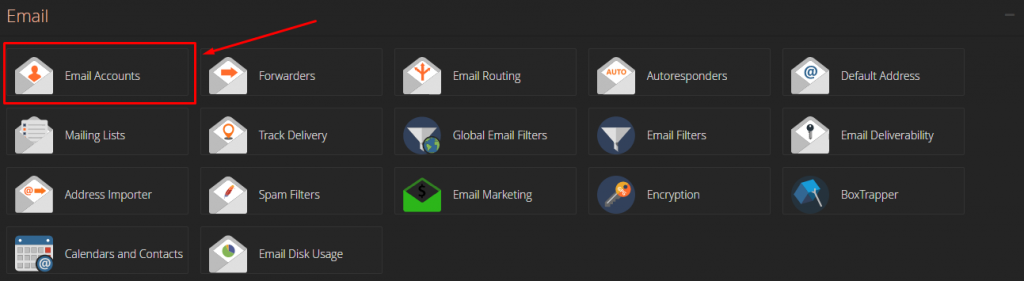
Once logged in, look for the “Email” Section and click on the “Email Account” setting, as illustrated below
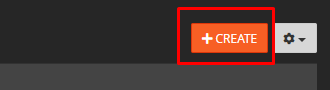
Once presented with the Email Accounts page, simply locate and click on the “Create” button towards the right of the page
An email account creation form should now be generated, simply fill in the details/settings to your liking and click “create”
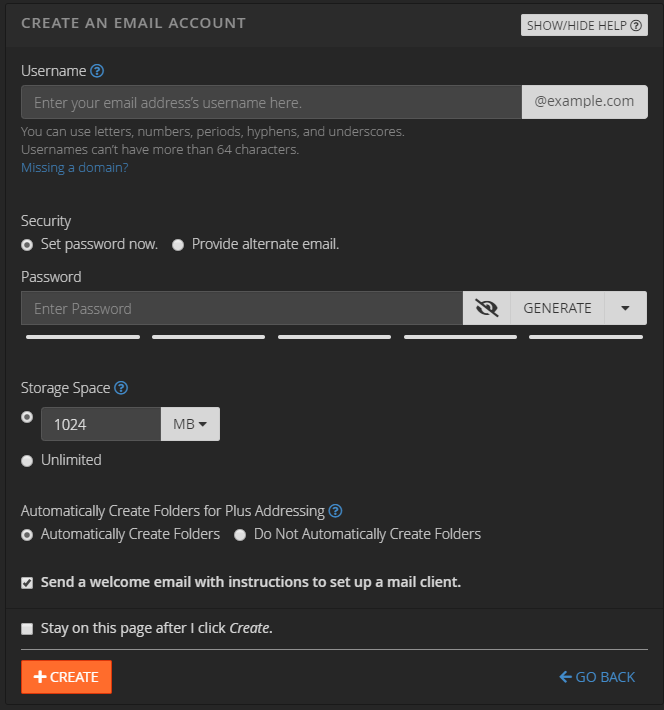
- Username: The username of your email account, which is the email address, basically. For example, username@domain.com
- Security: The password of your email account
- Storage Space: The total disk space that the email account can use from your total hosting account's disk space.
- Create Folders for Plus Addressing: Create a new folder if the email address is addressed with a “+”. For example, an email sent to username+tom@domain.com will open a folder under “Tom” within the email account. We would recommend keeping this enabled.
After you have created your email account, you will be redirected to the "Email Accounts" page, where you can view your newly created email account.
You can access your email account by clicking the "Access Webmail" button next to the email account you just created. Alternatively, you can set up your email account on an email client like Microsoft Outlook or Apple Mail.
To set up your email account on an email client, you will need to use the following settings:
Incoming mail server: mail.yourdomain.com (replace "yourdomain.com" with your actual domain name)
Outgoing mail server: mail.yourdomain.com (replace "yourdomain.com" with your actual domain name)
Username: your email address (e.g. john@example.com)
Password: the password you set up for this email account
After entering these details, you can send and receive emails using your new email account.That's it! You have successfully created an email account using cPanel and set it up on your email client.